
Autodesk Inventor 2027: What’s New
Autodesk Inventor 2027 introduces improvements that help engineers design faster, work more efficiently, and stay connected throughout their workflows.
Autodesk Inventor 2027 introduces a new set of improvements designed to help engineers design faster, work more efficiently, and stay connected throughout their workflows. The release brings significant everyday productivity improvements, powerful AI features such as Autodesk Assistant, more automation through visual iLogic tools, new part modeling tools, and major interoperability enhancements.
Autodesk Assistant
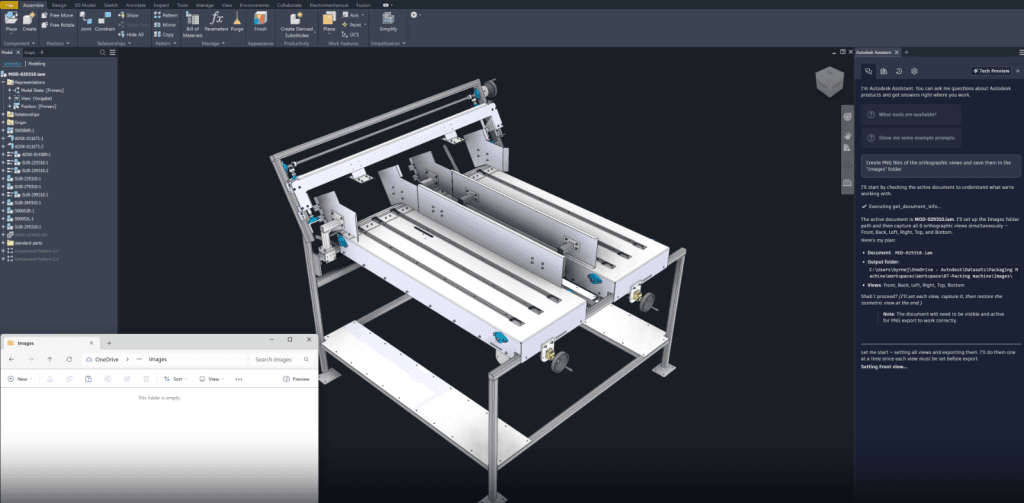
Autodesk Inventor 2027 introduces Autodesk Assistant, an AI-powered intelligent environment that changes how you interact with your designs. You can simply ask questions, give instructions, and obtain useful results, much like working with a colleague.
With an interface built directly into Inventor, you can quickly analyze models, create model states, suppress components, generate parameters, and automate repetitive tasks without opening numerous files or writing any code.
Whether defining parametric designs, checking manufacturability, or exporting data, Autodesk Assistant helps you move faster and work more efficiently. By streamlining everyday workflows and providing insights immediately, it allows you to focus more on design and innovation while laying the foundation for a future where AI becomes a true partner in development.
iLogic Codeblocks
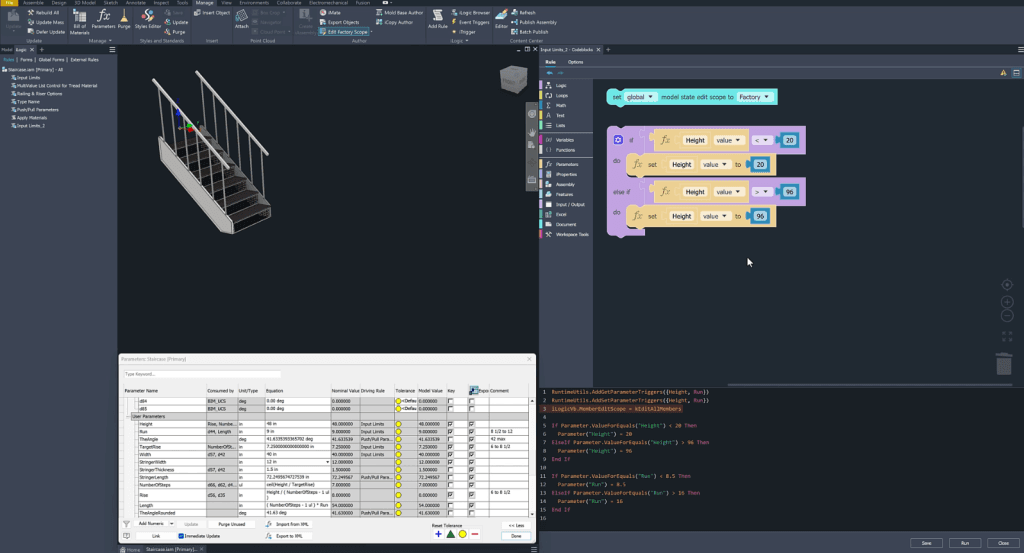
Inventor 2027 continues to expand automation and makes it more accessible than ever with the introduction of iLogic Codeblocks.
iLogic is now easier to learn thanks to a new visual programming interface that replaces scripting with intuitive drag-and-drop logic. By connecting puzzle-like blocks representing parameters, conditions, and actions, users can build automation workflows step by step with guidance to understand how the pieces fit together.
At the same time, Codeblocks bridges the gap to advanced use by displaying the underlying iLogic code in real time, allowing users to study, refine, and expand their rules as they gain experience.
The result is a more accessible path to automation, enabling more designers and engineers to create smarter models, streamline repetitive work, and reach new levels of productivity.
New Slot Feature
Inventor 2027 introduces a new slot feature that provides greater speed, precision, and flexibility for one of the most common design tasks. Directly in the workspace and modern Properties panel, you can define a slot's size, orientation, and location quickly and with full control.
Supporting standard options as well as countersunk and counterbored variants, the feature provides the familiar capabilities of the Hole command while expanding design options for real manufacturing needs.
Whether you control slot size through dimensions, centerline definitions, or fastener-based clearances, or use reusable presets for common configurations, the new feature streamlines your workflow. It helps you design faster, reduce friction, and focus on what matters.
Assembly Mirror Improvements
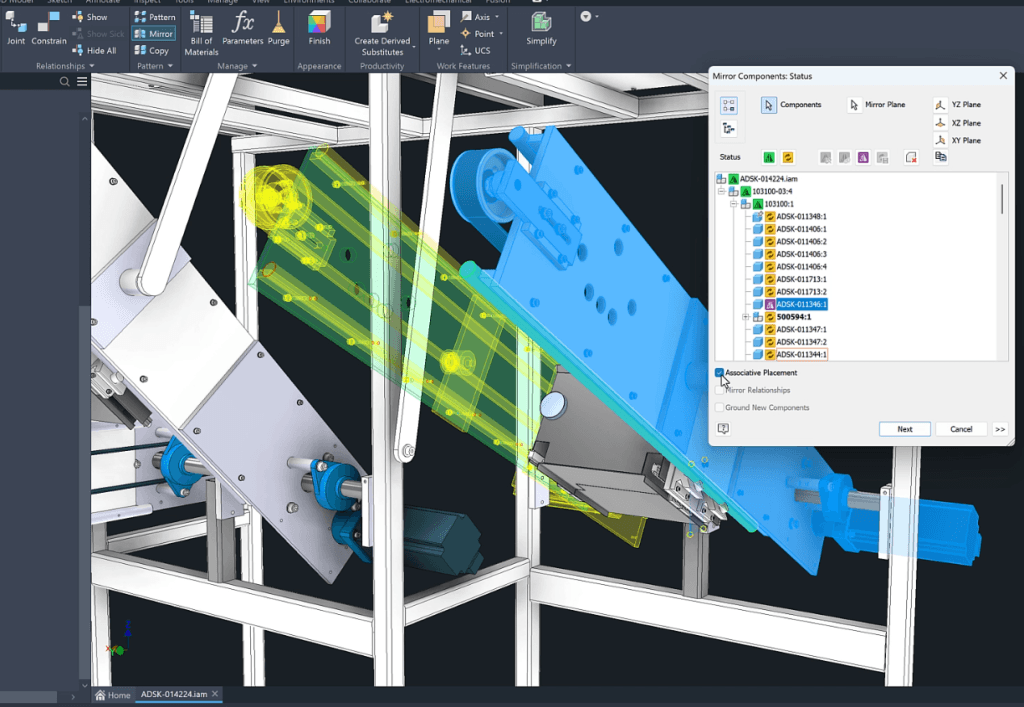
Inventor 2027 enhances the assembly mirroring workflow with more flexibility and control, allowing you to define exactly how mirrored components behave according to your design intent. Whether you want to preserve associativity with the original, break the link, create a new file, or mirror a component's feature tree, there are now several options to meet practical requirements.
You can also exclude certain components from the operation. With the new associative positioning option, you can move mirrored components while retaining their connection to the original design. Together, these improvements simplify creating and managing mirrored assemblies, allowing designs to be adapted quickly while maintaining precision and efficiency.
The Inventor 2027 Content Center improvement extends the library's capabilities by allowing entire assemblies, rather than just individual parts, to be published and reused. This takes the efficiency and standardization of design processes to a new level. Frequently used multicomponent models, such as cylinders, motors, and other purchased assemblies, can now be stored, managed, and inserted as easily as standard components.
With a familiar publishing process, support for metadata and previews, and flexible placement options—including configurable assemblies with model states—teams can build richer libraries that reflect actual design requirements. The improvement makes it easier to reuse proven designs, maintain consistency across projects, and accelerate development.
Conclusion
These are just a few of the many improvements included in Inventor 2027. The release marks a significant step forward in how designers and engineers work, combining AI assistance, more accessible automation, and enhancements to modeling and assembly workflows.
From collaborating with Autodesk Assistant to unlocking the potential of iLogic Codeblocks and streamlining daily tasks with the new Slot command, improved assembly mirroring, and expanded Content Center, the release is designed to help you move faster, work more efficiently, and design with greater confidence.
These innovations aim not only to improve individual features but also to enhance the quality of the entire workflow, reduce friction, increase reuse, and offer new ways to solve complex design challenges.
If you are considering adopting Autodesk Inventor in your workflows, you can get a 30-day trial. This lets you test the tool's capabilities and assess design stability before deciding to buy.
Tel.: 8 (7172) 57-70-75, 57-80-28
- Mobile
- 8 (701) 550-18-93 (+Whatsapp)
- office@cad.kz