
How to choose a high-performance computer for design
Software developers specify hardware requirements for files ranging from simple drawings to complex federated models. However, comparing requirements across applications is not easy…
For many years, CAD.kz has supplied software to design professionals, structural analysts, designers, and other specialists. Software developers specify hardware requirements for working with files ranging from simple drawings to complex federated models.
However, it can be difficult for designers to understand the overall requirements across different applications. We therefore set out to assemble a graphics workstation suitable for various software packages while accounting for their specific workloads.
First, a few words about hardware selection. The graphics card is one of the most important workstation components, so we paid particular attention to choosing one. “GeForce or Quadro?” is a common question among designers. After reviewing numerous manufacturer articles, test results, and technical requirements, we decided to test Quadro graphics cards. Autodesk certifies these cards for use with Revit, a key BIM design application.
Test hardware
Graphics cards
Nvidia Quadro P600
- CUDA Cores
- 384
- Peak Single Precision FP32 Performance
- 1.195 TFLOPS
- GPU Memory
- 2 GB GDDR5
- Memory Interface
- 128-bit
- Memory Bandwidth
- 64 GB/s
- System Interface
- PCI Express 3.0 x16
- Maximum Power Consumption
- 40 W
- Energy Star Enabling
- Yes
- Thermal Solution
- Ultra-quiet active fansink
- Form Factor
- 2.713” H x 5.70” L, Single Slot
- Display Connectors
- mDP 1.4 (4)
- DisplayPort with Audio
- Yes
- DVI-D Single-Link Connector
- Via optional adapters (MDP-DVI-SINGLE-PCK / MDP-DVI-FOUR-PCK)
- HDMI Support
- Via optional adapters (MDP-HDMI-SINGLE-PCK / MDP-HDMI-FOUR-PCK)
- VGA Support
- Via optional adapters (91007807-T / MDP-FOUR-VGA-PCK)
- Number of Displays Supported
- 4
- Maximum DP 1.4 Resolution
- HDR 5120 x 2880 at 60Hz (30-bit color)
- 5K Display Support
- HDR 5120 x 2880 at 60Hz (30-bit color)
- 4K Display Support
- HDR 4096 x 2160 at 60Hz or 3840 x 2160 at 60Hz
- Maximum DVI-D DL Resolution
- 2560 x 1600 at 60Hz via 3rd party adapter
- Maximum DVI-D SL Resolution
- 1920 x 1200 at 60Hz via optional adapter
- HDCP Support
- Yes
- Graphics APIs
- Shader Model 5.1, OpenGL 4.5, DirectX 12.0, Vulkan 1.0
- Compute APIs
- CUDA, DirectCompute, OpenCL
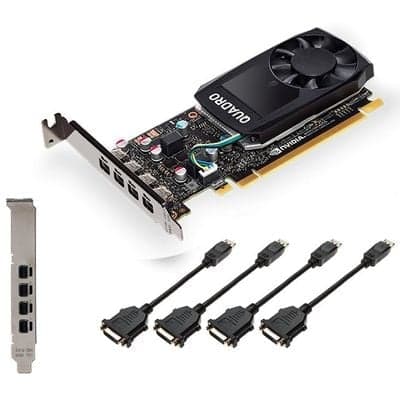
Nvidia Quadro P1000
- CUDA Cores
- 640
- Peak Single Precision FP32 Performance
- 1.894 TFLOPS
- GPU Memory
- 4 GB GDDR5
- Memory Interface
- 128-bit
- Memory Bandwidth
- 80 GB/s
- System Interface
- PCI Express 3.0 x16
- Maximum Power Consumption
- 47 W
- Energy Star Enabling
- Yes
- Thermal Solution
- Ultra-quiet active fansink
- Form Factor
- 2.713” H x 5.70” L, Single Slot
- Display Connectors
- mDP 1.4 (4)
- DisplayPort with Audio
- Yes
- DVI-D Single-Link Connector
- Via optional adapters (MDP-DVI-SINGLE-PCK / MDP-DVI-FOUR-PCK)
- HDMI Support
- Via optional adapters (MDP-HDMI-SINGLE-PCK / MDP-HDMI-FOUR-PCK)
- VGA Support
- Via optional adapters (91007807-T / MDP-FOUR-VGA-PCK)
- Number of Displays Supported
- 4
- Maximum DP 1.4 Resolution
- HDR 5120 x 2880 at 60Hz (30-bit color)
- 5K Display Support
- HDR 5120 x 2880 at 60Hz (30-bit color)
- 4K Display Support
- HDR 4096 x 2160 at 60Hz or 3840 x 2160 at 60Hz
- Maximum DVI-D DL Resolution
- 2560 x 1600 at 60Hz via 3rd party adapter
- Maximum DVI-D SL Resolution
- 1920 x 1200 at 60Hz via optional adapter
- HDCP Support
- Yes
- Graphics APIs
- Shader Model 5.1, OpenGL 4.5, DirectX 12.0, Vulkan 1.0
- Compute APIs
- CUDA, DirectCompute, OpenCL
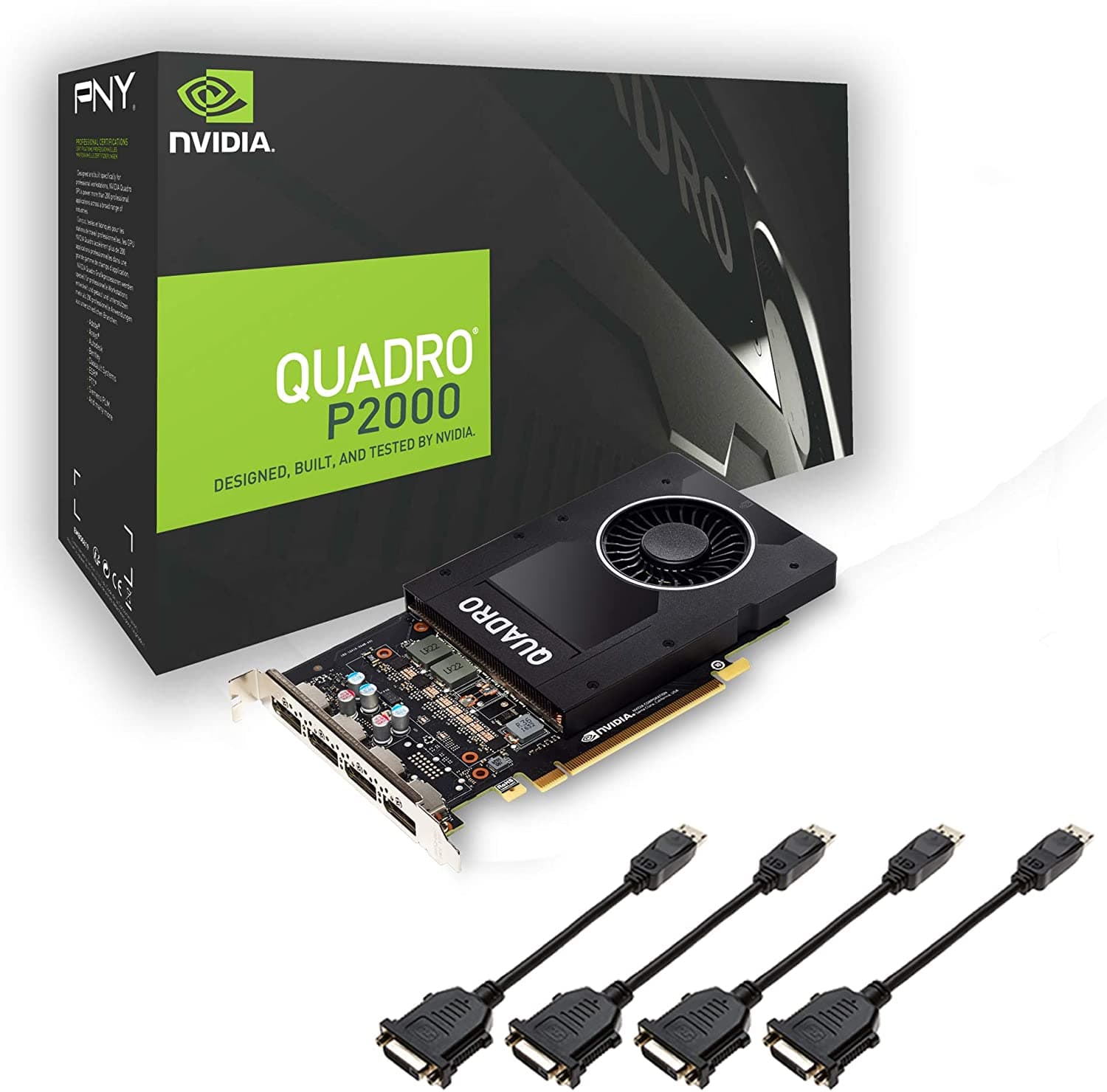
Nvidia Quadro P2000
- CUDA Cores
- 1024
- Peak Single Precision FP32 Performance
- 3.0 TFLOPS
- GPU Memory
- 5 GB GDDR5
- Memory Interface
- 160-bit
- Memory Bandwidth
- 140 GB/s
- System Interface
- PCI Express 3.0 x16
- Maximum Power Consumption
- 75 W
- Energy Star Enabling
- Yes
- Thermal Solution
- Ultra-quiet active fansink
- Form Factor
- 4.40” H x 7.90” L, Single Slot
- Display Connectors
- DP 1.4 (4)
- DisplayPort with Audio
- Yes
- DVI-D Single-Link Connector
- Via included adapter (MDP-DVI-SINGLE-PCK / MDP-DVI-FOUR-PCK)
- HDMI Support
- Via optional adapters (MDP-HDMI-SINGLE-PCK / MDP-HDMI-FOUR-PCK)
- VGA Support
- Via optional adapters (91007807-T / MDP-FOUR-VGA-PCK)
- Number of Displays Supported
- 4
- Maximum DP 1.4 Resolution
- HDR 5120 x 2880 at 60Hz (30-bit color)
- 5K Display Support
- HDR 5120 x 2880 at 60Hz (30-bit color)
- 4K Display Support
- HDR 4096 x 2160 at 60Hz or 3840 x 2160 at 60Hz
- Maximum DVI-D DL Resolution
- 2560 x 1600 at 60Hz via 3rd party adapter
- Maximum DVI-D SL Resolution
- 1920 x 1200 at 60Hz via included adapter
- HDCP Support
- Yes
- Graphics APIs
- Shader Model 5.1, OpenGL 4.5, DirectX 12.0, Vulkan 1.0
- Compute APIs
- CUDA, DirectCompute, OpenCL
NVIDIA Quadro graphics cards deliver optimized performance across a wide range of desktop and mobile workstations. They are certified and recommended by major OEM manufacturers and leading independent software vendors for meeting demanding quality standards. They also benefit from reliable, long-life driver releases.
Three graphics cards were selected for this test stage: P600, P1000, and P2000. We will assess whether paying more for an expensive graphics card is always necessary when working with CAD applications.
Explanation of several important graphics card specifications:
CUDA is NVIDIA's parallel computing architecture. It can significantly increase computing performance by using GPUs (graphics processing units).
DirectX/OpenGL
Direct3D is proprietary technology developed by Microsoft specifically for Windows. It is now also used on Microsoft Xbox. It is not available on other platforms (apart from API emulation through Wine and virtualization).
OpenGL is an open standard developed by the nonprofit Khronos Group with community participation. All major GPU manufacturers (nVidia, AMD, Intel) have influenced OpenGL. Unlike Direct3D, OpenGL is available on many platforms. In particular, it is the primary API for GPU interaction on Linux and Mac OS.
Direct3D is essentially fixed within a major version. Changes and additions usually arrive only with the next release.
In OpenGL, the API features actually available depend on the GPU manufacturer. OpenGL implementations can add extensions to the core specification. An application can retrieve a list of supported extensions at runtime and check whether its required extensions are available.
In practice, most OpenGL functionality consists of extensions. Its development follows this pattern: a new feature emerges, a manufacturer implements it in a driver and documents the extension. Applications can use the feature immediately without waiting for its inclusion in an official specification.
Processors
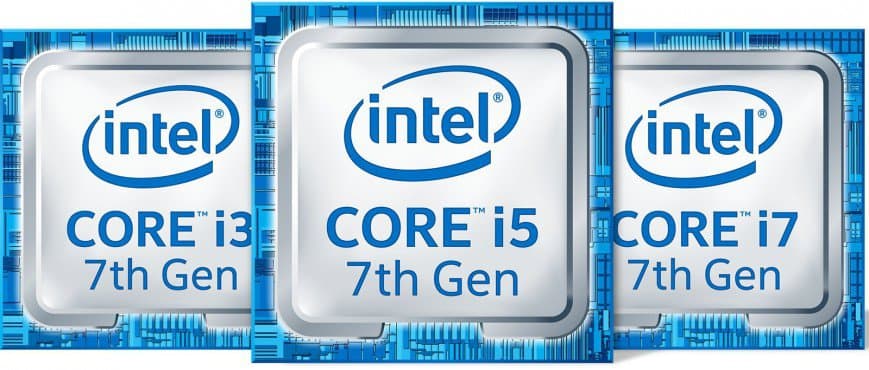
- Intel core i3-7100 3.9GHz
- Intel core i5-7500 3.4GHz
- Intel core i7-7700 4.2GHz
Intel processors offer high performance and capable computing. They support uninterrupted streaming, HD entertainment, full-screen 4K video, and panoramic video. Longer battery life supports mobility. These processors have a proven track record. We selected models with different clock frequencies and core counts.
RAM
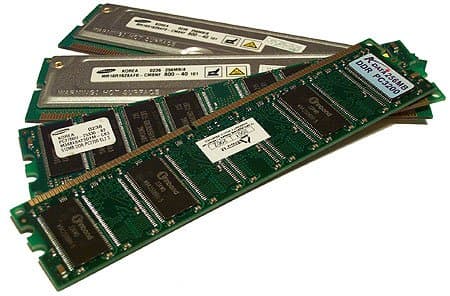
Modern design applications use substantial amounts of RAM, so we decided to test graphics workstations equipped with different memory capacities.
- 8 GB
- 16 Gb
- 32 Gb
| Kingston 8Gb/2400MHz DDR4 DIMM | |
|---|---|
| Memory type | DDR4 |
| Memory form factor | DIMM |
| Capacity per memory module | 8 GB |
| Performance | |
| Clock frequency | 2400 MHz |
| Bandwidth | PC19200 |
| Intel XMP profiles | 2400 MHz (15-15-15) |
| Supported operating modes | 1600 MHz, 1866 MHz, 2133 MHz, 2400 MHz |
Applications used for testing
- NanoCAD,
- AutoCAD,
- Revit,
- 3Ds Max,
- Vray
Manufacturer requirements
| Windows | CPU | DDR | SSD | graphics | |
|---|---|---|---|---|---|
| NanoCAD 8.1 | 7-10 | Pentium 4 + (32/64) | 4Gb | 2Gb+ | OpenGL/DirectX support and 1024 MB video memory |
| AutoCAD 2018 | 7-10 | 32-bit: 1GHz + 64-bit: 1GHz + | 4Gb | 4Gb+ | Nvidia Quadro… |
| Revit 2018 | 7-10 | Single- or Multi-Core Intel® Pentium®, Xeon®, or i-Series processor or AMD(64) | 4Gb | 5Gb | Nvidia Quadro… |
| 3ds Max 2018 | 7-10 | 64-bit Intel® or AMD® multi-core processor | 4Gb | 6Gb | Nvidia Quadro, GeForce Titan |
Test objects
| format | size | Number of elements | Number of polygons | ||
|---|---|---|---|---|---|
| 1 | Slab and column reinforcement plan | dwg | 47 627 kb | 699 471 | |
| 2 | Point cloud of an office | las | 1 137 922 kb | ||
| 3 | Point cloud of an office | rcs | 75 372 kb | ||
| 3 | Residential complex (АР) | rvt | 265 612 kb | 1337 | 4 972 772 |
| 4 | Residential complex (АР) | max | 408 688 kb | 4 972 772 | |
| 5 | Interior | max | 395 173 kb | 9 319 458 | |
Main configurations
| Configurations | |
|---|---|
| 1-4 | 7/32/2000, 7/32/1000, 7/16/2000, 7/16/1000 |
| 5-11 | 5/32/2000, 5/32/1000, 5/16/2000, 5/16/1000, 5/16/600, 5/8/1000, 5/8/600 |
| 12-14 | 3/16/1000, 3/16/600, 3/8/600 |
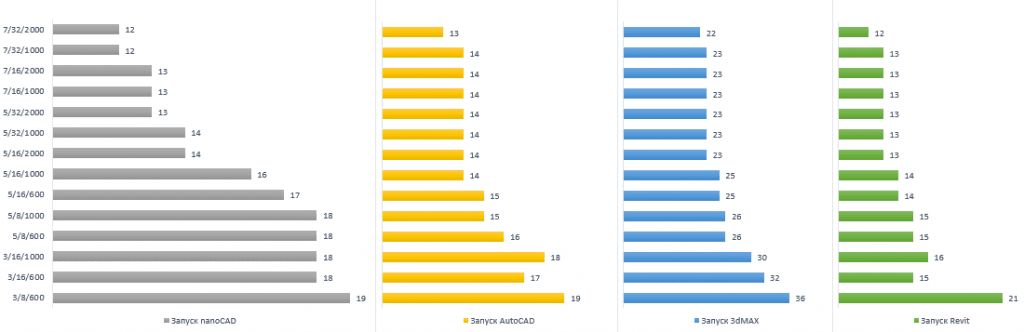
Application launch time (s)
File opening time (s)
Operating system startup/shutdown times on the workstation
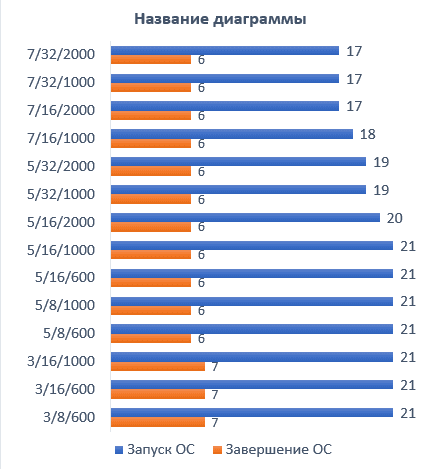
Overall performance of Iridium Line workstations
| Time, s | |||||||||||||||
|---|---|---|---|---|---|---|---|---|---|---|---|---|---|---|---|
| Configuration | OS startup | OS shutdown | nanoCAD launch | AutoCAD launch | 3dMAX launch | Revit launch | Open .dwg/nanoCAD | Open .dwg/AutoCAD | Open exterior .max | Open interior .max | Open .rvt | Open point cloud in nanoCAD | Open point cloud in AutoCAD | Open point cloud in Revit | |
| 1 | 7/32/2000 | 17 | 6 | 12 | 13 | 22 | 12 | 32 | 18 | 5 | 16 | 46 | 28 | 5 | 3 |
| 2 | 7/32/1000 | 17 | 6 | 12 | 14 | 23 | 13 | 32 | 18 | 5 | 16 | 46 | 28 | 5 | 3 |
| 3 | 7/16/2000 | 17 | 6 | 13 | 14 | 23 | 13 | 32 | 18 | 5 | 16 | 46 | 28 | 5 | 3 |
| 4 | 7/16/1000 | 18 | 6 | 13 | 14 | 23 | 13 | 32 | 18 | 5 | 16 | 46 | 28 | 5 | 3 |
| 5 | 5/32/2000 | 19 | 6 | 13 | 14 | 23 | 13 | 37 | 18 | 5 | 17 | 47 | 29 | 5 | 3 |
| 6 | 5/32/1000 | 19 | 6 | 14 | 14 | 23 | 13 | 37 | 18 | 5 | 17 | 47 | 29 | 5 | 3 |
| 7 | 5/16/2000 | 20 | 6 | 14 | 14 | 23 | 13 | 37 | 18 | 5 | 17 | 50 | 29 | 5 | 3 |
| 8 | 5/16/1000 | 21 | 6 | 16 | 14 | 25 | 14 | 38 | 19 | 6 | 18 | 52 | 29 | 5 | 3 |
| 9 | 5/16/600 | 21 | 6 | 17 | 15 | 25 | 14 | 38 | 19 | 6 | 18 | 52 | 29 | 5 | 3 |
| 10 | 5/8/1000 | 21 | 6 | 18 | 15 | 26 | 15 | 39 | 19 | 7 | 19 | 53 | 29 | 6 | 3 |
| 11 | 5/8/600 | 21 | 6 | 18 | 16 | 26 | 15 | 39 | 20 | 6 | 19 | 53 | 33 | 6 | 3 |
| 12 | 3/16/1000 | 21 | 7 | 18 | 18 | 30 | 16 | 41 | 21 | 7 | 21 | 54 | 33 | 6 | 3 |
| 13 | 3/16/600 | 21 | 7 | 18 | 17 | 32 | 15 | 41 | 21 | 8 | 21 | 55 | 35 | 6 | 3 |
| 14 | 3/8/600 | 21 | 7 | 19 | 19 | 36 | 21 | 42 | 22 | 8 | 22 | 57 | 37 | 6 | 3 |
Conclusions:
Application launch time depends directly on the number of processor cores. NanoCAD is more sensitive to core count, with greater variation in launch time across configurations. Point cloud tests also produced notable results: Autodesk products were less demanding on computer resources.
Workstation performance measurements
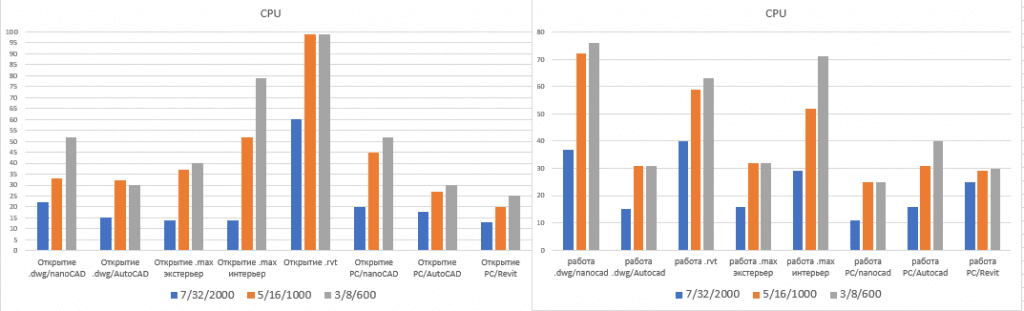
First, consider the CPU test results. File opening and editing are the most CPU-intensive operations, while starting an application uses about 50% CPU load (i3). When selecting a configuration, pay special attention to opening .rvt and .max files and large .dwg files in nanoCAD. We do not recommend i3 processors. Highly textured interiors are more demanding than low-polygon architectural scenes. nanoCAD requires more resources than AutoCAD.
RAM test results
All configurations meet manufacturers’ minimum RAM requirements. However, memory capacity plays an important role in 3d Max and Revit. Revit currently supports multicore processing for its main tools. The RAM needed on a local computer is approximately 20 times the size of the compressed project repository file.
Overall test results
| Work with .dwg/AutoCAD | Work with .rvt | Work with .max | Point cloud work in nanoCAD | |||||||||||||
|---|---|---|---|---|---|---|---|---|---|---|---|---|---|---|---|---|
| Configuration | CPU | DDR | SSD | CPU | DDR | SSD | CPU | DDR | SSD | CPU | DDR | SSD | ||||
| 1 | 7/32/2000 | 15 | 20 | 0 | 40 | 26 | 0 | 29 | 20 | 0 | 11 | 15 | 0 | |||
| 2 | 7/32/1000 | 15 | 24 | 0 | 40 | 26 | 0 | 29 | 19 | 0 | 11 | 15 | 0 | |||
| 3 | 7/16/2000 | 16 | 42 | 0 | 43 | 42 | 0 | 30 | 40 | 0 | 10 | 30 | 0 | |||
| 4 | 7/16/1000 | 16 | 40 | 1 | 38 | 47 | 0 | 28 | 36 | 0 | 11 | 31 | 0 | |||
| 5 | 5/32/2000 | 31 | 20 | 0 | 61 | 20 | 0 | 56 | 20 | 0 | 22 | 15 | 0 | |||
| 6 | 5/32/1000 | 31 | 20 | 0 | 62 | 26 | 0 | 56 | 20 | 0 | 24 | 15 | 0 | |||
| 7 | 5/16/2000 | 31 | 26 | 0 | 63 | 38 | 0 | 57 | 37 | 0 | 25 | 26 | 0 | |||
| 8 | 5/16/1000 | 31 | 26 | 0 | 60 | 39 | 0 | 58 | 35 | 0 | 25 | 26 | 0 | |||
| 9 | 5/16/600 | 31 | 27 | 1 | 60 | 40 | 0 | 60 | 35 | 0 | 25 | 28 | 0 | |||
| 10 | 5/8/1000 | 31 | 48 | 0 | 60 | 70 | 0 | 64 | 93 | 0 | 25 | 44 | 0 | |||
| 11 | 5/8/600 | 30 | 48 | 0 | 60 | 70 | 0 | 65 | 94 | 0 | 25 | 45 | 0 | |||
| 12 | 3/16/1000 | 35 | 41 | 0 | 62 | 41 | 0 | 64 | 38 | 0 | 25 | 31 | 0 | |||
| 13 | 3/16/600 | 47 | 27 | 0 | 63 | 38 | 0 | 71 | 40 | 0 | 25 | 30 | 0 | |||
| 14 | 3/8/600 | 47 | 51 | 0 | 63 | 72 | 0 | 71 | 84 | 0 | 25 | 60 | 0 | |||
SSD test results
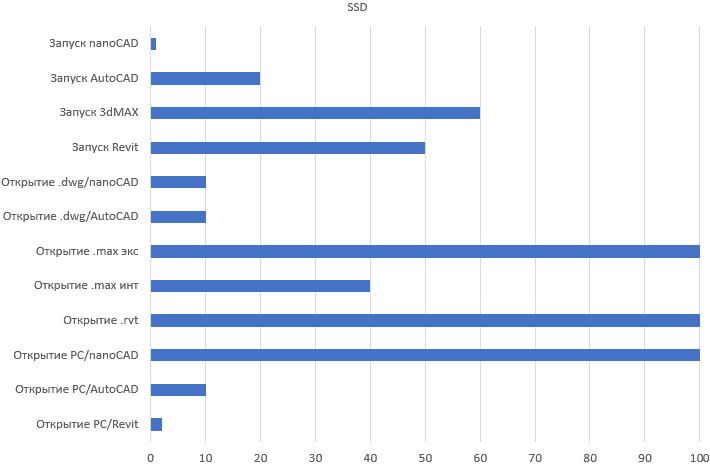
The SSD plays an important role in 3d Max and Revit, as well as in nanoCAD when working with point clouds.
Graphics card performance measurements
2 .max files were selected to assess graphics card performance: one with a moderate polygon count and one with a high polygon count. Key factors include the number of polygons to process and the use of architectural materials such as glass, metal, and fabric.
FPS, GPU load, and work quality/usability measurements
Rendering
| Performance (%,%,%,%,Mb.C,Db,min) | ||||||||||||||||||||||
|---|---|---|---|---|---|---|---|---|---|---|---|---|---|---|---|---|---|---|---|---|---|---|
| 3dMax rendering | Revit rendering | Vray benchmark | ||||||||||||||||||||
| Item | CPU | DDR | SSD | GPU | Mem | Temp | noise | Exterior time | Interior time | CPU | DDR | SSD | GPU | Mem | Temp | noise | time | cpu | gpu | |||
| 1 | 7/32/2000 | 100 | 28 | 1 | 1 | 3320 | 39 | 25 | 22m50s | 26m03s | 100 | 38 | 1 | 28 | 1145 | 51 | 25 | 5m48c | 2m10c | 3m0c | ||
| 2 | 7/32/1000 | 100 | 38 | 1 | 1 | 2194 | 43 | 25m28c | 28m11s | 100 | 29 | 0 | 30 | 869 | 48 | 5m50c | 2m05s | 4m56s | ||||
| 3 | 7/16/2000 | 100 | 78 | 1 | 1 | 2197 | 45 | 26m34s | 30m14s | 100 | 55 | 0 | 1 | 1212 | 50 | 06m27s | 2m05s | 4m56s | ||||
| 4 | 7/16/1000 | 100 | 80 | 0 | 1 | 2353 | 44 | 26m59 | 31m58s | 100 | 57 | 0 | 1 | 1035 | 59 | 06.59c | 2m05s | 4m56s | ||||
| 5 | 5/32/2000 | 100 | 31 | 0 | 1 | 1568 | 53 | 45m21s | 53m41s | 100 | 29 | 0 | 1 | 731 | 50 | 05.15s | 3m26s | 2m56s | ||||
| 6 | 5/32/1000 | 100 | 42 | 0 | 1 | 1973 | 42 | 46m18s | 53m12s | 100 | 30 | 0 | 1 | 735 | 52 | 05m16s | 3m26s | 2m56s | ||||
| 7 | 5/16/2000 | 100 | 75 | 0 | 1 | 1875 | 38 | 47m41s | 53m41s | 100 | 57 | 0 | 1 | 734 | 52 | 05m15s | 3m26s | 2m58s | ||||
| 8 | 5/16/1000 | 100 | 78 | 0 | 1 | 2394 | 38 | 48m07s | 53m59s | 100 | 55 | 0 | 1 | 635 | 52 | 05m34s | 3m28s | 4m56s | ||||
| 9 | 5/16/600 | 100 | 79 | 0 | 1 | 2234 | 38 | 48m01s | 54m13s | 100 | 56 | 0 | 1 | 721 | 53 | 06m48s | 3m28s | 4m56s | ||||
| 10 | 5/8/1000 | 100 | 95 | 0 | 1 | 2150 | 44 | 53m10s | 55m58s | 100 | 93 | 0 | 1 | 742 | 55 | 06.31s | 3m28s | 4m56s | ||||
| 11 | 5/8/600 | 100 | 96 | 0 | 1 | 1784 | 45 | 51m13s | 56m56s | 100 | 94 | 0 | 1 | 756 | 57 | 06.39s | 3m28s | 4m56s | ||||
| 12 | 3/16/1000 | 100 | 75 | 0 | 1 | 2359 | 42 | 1h02m49s | 1h34m47s | 100 | 52 | 0 | 1 | 2458 | 54 | 06.46s | 4m58s | 8m14s | ||||
| 13 | 3/16/600 | 100 | 65 | 0 | 2 | 1873 | 42 | 1h7m57s | 1h34m47s | 100 | 55 | 0 | 1 | 2403 | 54 | 06.48s | 5m01s | 8m14s | ||||
| 14 | 3/8/600 | 100 | 99 | 0 | 3 | 1787 | 44 | 1h15m41s | 1h26m53s | 100 | 99 | 0 | 1 | 2380 | 54 | 09.48s | 5m04s | 8m14s | ||||
Processor core count and clock frequency are critical for rendering.
Based on the test results, workstations were classified and grouped by purpose and file size:
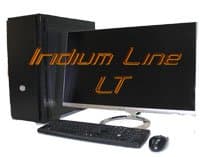
Powerful entry-level graphics workstation.
The entry-level Iridium Line LT workstation is built around a 4-core Intel® Core™ i5 or 2-core Intel® Core™ i3 processor, together with a modern professional NVIDIA Quadro P400 or P 600 graphics card. This combination provides high computing performance at an accessible price.
Reliable workstation operation is supported by carefully selected components, effective cooling, a high-quality power supply, precise assembly, and multilevel testing.
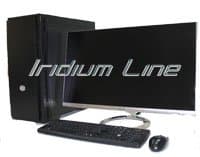
High-performance graphics workstation for professional use.
Iridium Line workstations are built around Intel® Core™ i5 or 2-core Intel® Core™ i7 processors and equipped with professional NVIDIA Quadro P100 or P 600 graphics cards. They were developed specifically for CAD work based on our many years of experience with architects, engineers, and designers.
Every workstation uses new-generation NVIDIA Quadro professional graphics cards based on NVIDIA Pascal™ GPU architecture, with advanced support for four 4K displays. The cards have a low-profile form factor and deliver strong performance across professional applications.

Professional workstation for large BIM projects
Iridium Line Plus is built on an Intel® Core™ i7 processor and fitted with professional NVIDIA Quadro P4000, P5000, and P6000 graphics cards. These high-performance workstations are designed for professional CAD packages, team-based workflows (including BIM), complex graphics tasks, and photorealistic rendering.
The main differences between graphics workstations and ordinary computers are performance and reliability. Iridium Line Plus targets resource-intensive applications involving many calculations, photorealistic visualization, and fast, reliable data storage.
Iridium Line systems include new-generation NVIDIA Quadro graphics cards that deliver substantial performance improvements over previous models.
Equipment photos
Article author:
Oksana Danilevich
Technical Director, CAD.kz LLP
All materials in this article are protected by copyright. Copying, distributing (including reposting on other websites and online resources), or otherwise using this information and materials without prior permission from the copyright holder is prohibited.