
Data Model API Included in Subscriptions and Flexible Scaling Options
Autodesk Platform Services (APS) helps customers extend the capabilities of Autodesk products with powerful APIs and services for data access, automation, and integration in AEC and manufacturing. As the APS business model evolves, we aim to deliver this value in a transparent and predictable way. We will now announce changes to API pricing at least 90 days in advance. This gives you time to understand the changes, plan your work, and adapt without disrupting existing workflows.
Contents
Autodesk Platform Services (APS) helps customers extend the capabilities of Autodesk products with powerful APIs and services for data access, automation, and integration in architecture, engineering, and construction (AEC) and manufacturing.
As the APS business model evolves, we aim to deliver this value on transparent and predictable terms. Going forward, we will announce any changes to our API pricing at least 90 days before they take effect. This gives users time to understand the changes, plan ahead, and adapt without disrupting existing workflows.
As APS usage grows, we are also linking API access more closely to Autodesk product subscriptions. This makes it easier to develop and scale solutions based on the products you already use.
What is changing
Charges for using the Autodesk Data Model APIs are being introduced in phases:
- Manufacturing Data Model APIs: pricing takes effect on August 17, 2026.
- AEC Data Model APIs: pricing takes effect on October 6, 2026.
All users can still get limited access to these APIs through the free APS Free plan for exploration and experimentation.
If you have an eligible Autodesk product subscription, it will include a monthly API usage allowance. This lets you start building and automating workflows right away, without buying additional API access.
The included monthly volume is enough not only for experimentation but also for real production workflows. If your needs grow, flexible paid options are available to extend the limits.
To use the API volume included with a product subscription, APS apps must be in the same team (Team) to which the corresponding subscription is assigned.
The available usage volume is pooled at the team level. This means all apps within one team can share a common allowance.
If usage exceeds the included allowance, you can use the paid APS plans: Prepay with Flex or Pay as You Go. They let you scale API usage with predictable costs. You pay only when you need access to larger volumes of data or export capabilities.
The full list of products whose subscriptions entitle you to an included usage volume for the AEC Data Model and Manufacturing Data Model APIs, as well as the monthly limits and new rates, is provided below in the original table.
The values shown are per subscription. When you purchase multiple subscriptions, the total included volume increases. It is pooled at the team level.
Note. The AEC rates shown below apply to Data Out only.
Data Out is the detailed data your tools retrieve from the AEC Data Model through queries. It includes individual objects, their properties, and geometry.
Each query calls the AEC Data Model API. For example, you can request all windows in a model along with their properties. Data Out volume is measured in megabytes (MB) and depends on the size of the data returned by each query, not on the total size of the source model. Therefore, more precise queries limited to the elements and properties you need use less data.
There is no charge per query. Billing starts only after you exceed the Data Out volume included in your subscription.
There is no charge for Data In and administrative operations.
- Data In: data you add to the AEC Data Model, such as additional properties.
- Administration: managing permissions and members, browsing folders, and organizing project data.
Data transfer between Autodesk products is also not billed. You can track Data In and Data Out volumes in megabytes in your Autodesk account and on the APS Developer Hub portal.
Existing development processes also remain unchanged. Opening models in Revit, downloading files from Forma Data Management, and exporting to IFC are performed within Autodesk products.
These operations do not use the AEC Data Model API, so the new pricing does not apply to them.
Data Model API pricing
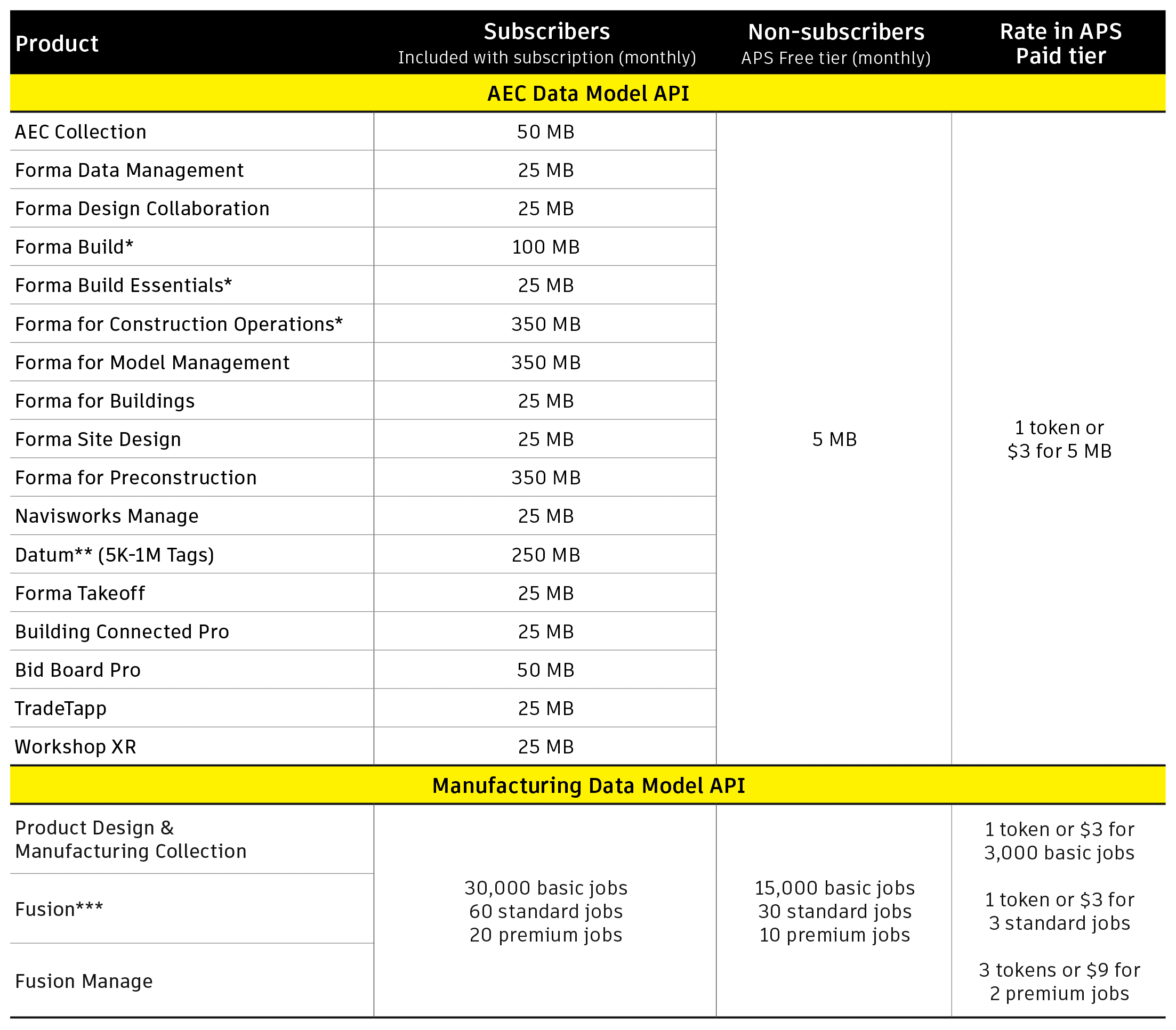
Manufacturing Data Model API job type definitions:
Jobs are divided into four categories depending on the operation performed through the API:
- Free: administrative operations.
- Basic: API requests that return components. Each returned component counts as one job.
- Standard: GraphQL API requests initiated from the Model object to export derivative file formats defined in DerivativeFormatEnum.
- Premium: a category reserved for future features and capabilities.
The value of the APS Data Model APIs
The APS Data Model APIs provide direct cloud access to structured design and manufacturing data. This makes it possible to build smarter, more automated, and more scalable solutions without manual data export or workflows tied to desktop applications.
Manufacturing Data Model APIs
Provide programmatic access to product and manufacturing data. Teams can retrieve information about assemblies, parts, and their properties, integrate data with ERP and PLM systems, and automate downstream processes that pass design data to manufacturing and enterprise information systems.
AEC Data Model APIs
Let you retrieve detailed model and project data through queries.
This opens up possibilities for automating reporting, quality checks, dashboard creation, and multi-project analysis. As a result, teams can reduce manual work and make data-driven decisions.
In this context, detailed data is information at the parameter level of individual BIM objects. It lets you extract only the information you need without downloading the entire model.
For example, the Revit sample model Snowdon Towers is 90 MB. Using the API, retrieving all door information takes only 1.55 MB, and a similar query for windows takes 1.12 MB.
This clearly shows how the AEC Data Model APIs provide more targeted and efficient access to project information.
With programmatic access to this data, APS helps connect different systems, eliminate repetitive operations, and build production-ready workflows that can scale as your business grows.
What you need to do
Any API usage beyond the free APS Free allowance will require either an active paid APS subscription or an eligible Autodesk product subscription with an included API usage volume.
If you already use the Manufacturing Data Model APIs, Autodesk recommends taking the following steps.
1. Check your subscriptions.
Make sure your organization has eligible subscriptions that include an API usage volume. To use it in full, check that APS Developer Hub and its related apps are in the same team as your Autodesk product subscriptions. The available usage volume is shared among all apps at the team level.
2. Choose a payment method.
If you do not have an eligible subscription, choose one of the payment options: Prepay with Flex or Pay as You Go. This helps you avoid service interruptions.
Frequently asked questions
Can I still access and export my data without extra charges for the AEC Data Model API?
Yes. Opening models in Revit, downloading files from Forma Data Management, and exporting to IFC are performed directly in Autodesk products. These processes do not use the AEC Data Model API, so the new pricing does not apply to them.
How exactly is the cost calculated: per API call, per megabyte, or per token?
Autodesk distinguishes four types of data usage in the AEC Data Model API:
- Administrative operations (for example, authentication and folder browsing).
- Data transfer into the AEC Data Model.
- Data transfer within the Autodesk ecosystem.
- Data export outside the Autodesk ecosystem (Data Out).
You are charged only for Data Out. It is calculated in megabytes (MB).
Does pricing apply to all versions of the Manufacturing Data Model API?
Pricing applies to version 3 only. Version 2 will be retired in the near future. If you have an eligible Autodesk product subscription, the monthly usage volume for version 3 of the API is included at no additional charge. The exact end-of-support date for version 2 has not yet been set. When it is set, Autodesk will publish a notice along with a migration plan and will inform you in advance about the required actions.
Will existing integrations and workflows stop working?
If API usage exceeds the included allowance, an active paid APS subscription is required. Otherwise, service interruptions are possible.
Can I still experiment with the API and build prototypes?
Yes. You can explore and test the APS APIs and build prototypes for free by signing up for the APS Free plan.
How can I make the most of the API volume I have already paid for?
To get the most from your included allowance, make sure your APS Developer Hub apps are in the same team as your Autodesk product subscriptions. Because the available usage volume is pooled at the team level, keeping all resources in one team lets apps share the entire available allowance. If your resources are spread across several teams, consider merging them or moving the subscriptions to one team.
How can I estimate API costs in advance given the pricing changes?
Autodesk recommends working with your developers to analyze current API usage and forecast future volumes. You can then apply the new rates to these estimates to determine likely costs in advance.
How will the APS pricing changes affect customers with an active Enterprise Business Agreement (EBA)?
We recommend reviewing the terms of your agreement to determine how they apply to your organization. EBA customers receive an included API usage volume only if they have purchased eligible product subscriptions that provide API access. If an EBA customer has not purchased such a subscription, access to APS is provided on a pay-for-actual-consumption model. Usage is measured in tokens and billed according to the APS rate table.