
How to Identify a DWG File Version
Instructions for identifying a DWG file version.
Instructions for identifying a DWG file version.
There are two simple ways to identify the version. Choose whichever works best for you.
1. Open the File in AutoCAD
The most straightforward way to find the DWG version is to open the file in AutoCAD. If it opens successfully, the command line displays a line with the version number:
“Opening AutoCAD XXXX format file”
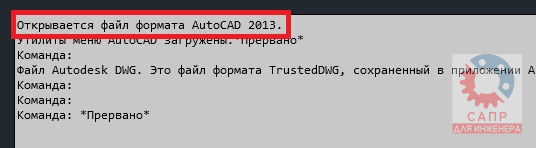
Press F2 to open the command line message history.
However, this method does not always work.
First, AutoCAD may not be installed on the computer.
Second, the DWG file may be damaged and fail to open.
Third, the DWG file may have been created in a newer version than the one installed (in which case AutoCAD will not open it and will display a message).
2. Open the File in a Text Editor
To identify the DWG version, open it in a text editor such as Windows Notepad (right-click the file in File Explorer and choose “Open with”).
The first six characters of the file encode its DWG format version.
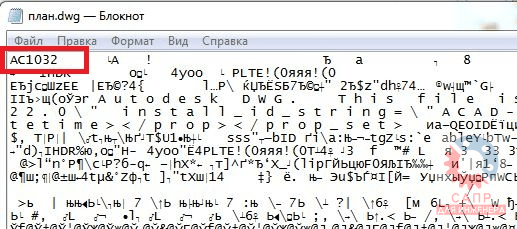
Version codes for modern DWG files:
- AC1014 - AutoCAD R14
- AC1015 - AutoCAD 2000
- AC1018 - AutoCAD 2004
- AC1021 - AutoCAD 2007
- AC1024 - AutoCAD 2010
- AC1027 - AutoCAD 2013
- AC1032 - AutoCAD 2018
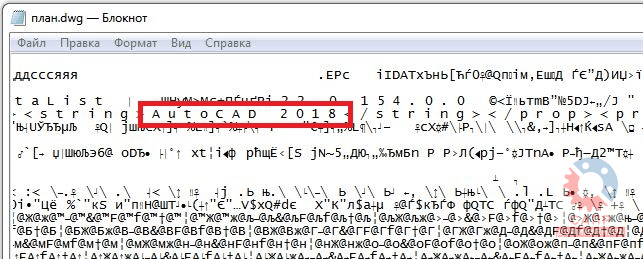
You can also search the file for a u t o c a d (exactly like that, with spaces between the letters) to see the version.
Conclusion
It is important to understand the difference between the DWG file version and the AutoCAD version in which it was saved: the same format can be native to multiple program releases. As you can see, identifying the DWG format version is easy, but determining the exact software release used to save the file is almost impossible.
Author: A. Mikhailov